How to Play Spacetravel
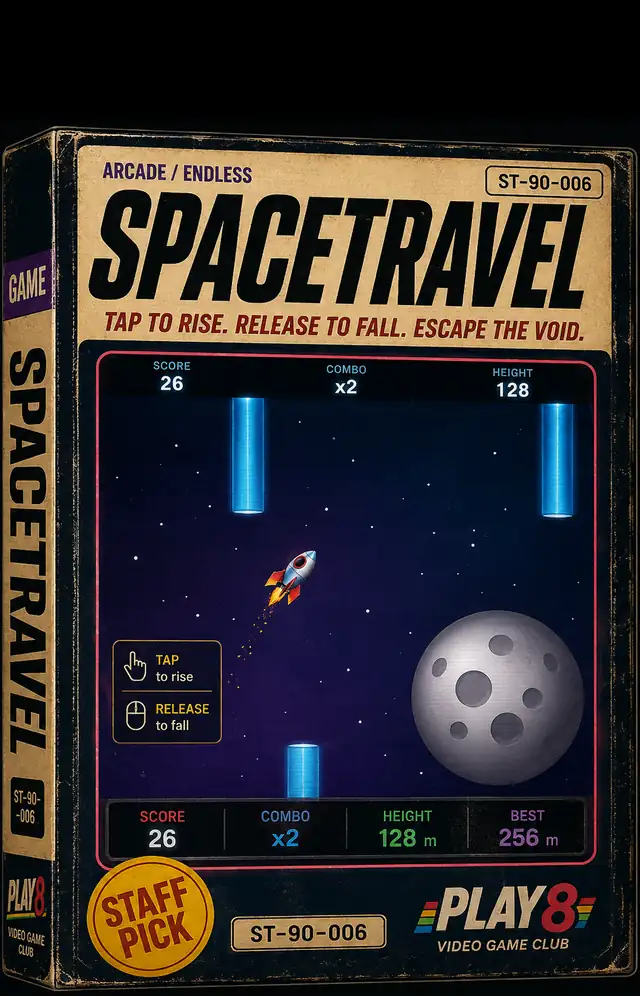
Spacetravel is a vertical-scrolling arcade dodger built around a single control: press and hold anywhere on the screen to boost a small silver rocket upward, and let go to let gravity pull it back down. A quick tap only lifts the rocket for an instant before it starts falling again, so surviving is about holding through the boost and choosing the right moment to release, not tapping repeatedly.
The threat comes from pairs of blue capsule-shaped barriers that scroll in from the top and bottom of the screen, leaving a gap in the middle that the rocket has to thread. Clipping a barrier, or dropping to the bottom of the screen, ends the run immediately and brings up a GAME OVER screen with a RETRY button — there's no automatic restart.
The run is built from 7 levels, tracked by a row of dots at the top of the screen. Each level swaps in a different backdrop as the rocket travels further from home, moving from Earth through the Moon, Mars, Jupiter, Venus and Saturn on the way to the Sun. Later levels scroll faster, narrow the gaps between barriers, and set the barriers moving up and down instead of staying still.
Tapping the title screen both starts the run and delivers the rocket's first boost, so the very first input already has consequences. A HUD tracks SCORE, a COMBO multiplier, and HEIGHT as you fly, and the game's built-in hint describes a GOAL gate waiting at the end of the run for players who make it that far.
Controls
- Press and hold anywhere on the screen to boost the rocket upward.
- Release to let gravity pull the rocket back down.
- A single quick tap only lifts the rocket for a moment before it falls again.
- The opening tap on the title screen both starts the run and fires the first boost.
Tips & Strategy
Hold, don't tap
The single biggest adjustment for new players is resisting the urge to tap repeatedly. A tap barely nudges the rocket before gravity takes back over, which is why an all-tap approach crashes within a couple of seconds. Holding the screen down and easing off only when a gap calls for it gives far more control over the rocket's height.
Track the dot row, not just the gaps
The seven-dot indicator at the top of the screen is the clearest read on how far you've come and how much harder the run is about to get. Because scroll speed climbs and gaps narrow with every level, treat an early level cleared cleanly as the moment to tighten your hold-and-release timing before the next one arrives.
Expect the backdrop to keep changing
Each level is built to swap in a new planetary backdrop — Earth gives way to the Moon, Mars, Jupiter, Venus, Saturn and finally the Sun — so a shifting background marks a level change rather than a distraction. Use it as a cue that the barrier pattern in front of you is about to move differently than the one before it.
A crash only costs the run, not your progress
Since there's no auto-restart, every crash puts you back at a GAME OVER screen with a RETRY button rather than quietly resetting your position mid-flight. Treat each attempt as a clean run at the barrier gaps — release and re-hold cleanly instead of fighting a bad boost.
Frequently Asked Questions
Is Spacetravel free to play?
Yes. It loads directly in your browser with no download or account required.
How many levels does Spacetravel have?
Seven, shown as a row of dots at the top of the screen. Each one changes the backdrop and makes the gaps between barriers tighter and faster.
How do I control the rocket?
Press and hold anywhere on the screen to boost the rocket upward, and release to let it fall. A brief tap only lifts it for an instant before gravity takes over again.
What ends a run?
Clipping one of the scrolling barriers or dropping to the bottom of the screen ends the run immediately and brings up a GAME OVER screen with a RETRY button.
Do the levels look different from each other?
Yes. Spacetravel is built to give each of its seven levels its own backdrop, moving from Earth through the Moon, Mars, Jupiter, Venus and Saturn on the way to the Sun.